
Tired of messy HDMI cables? A 4K wireless HDMI extender is the perfect solution for gaming, streaming, and even security monitoring. Learn how to set up and use a wireless HDMI transmitter and receiver in this guide.

A wireless HDMI extender allows you to transmit video and audio from devices like gaming consoles, cable boxes, and streaming devices to a display without using HDMI cables.
Setting up a wireless HDMI extender is simple. Follow these steps:
We tested the Bmoste 4K wireless HDMI extender in different scenarios:
| Test | Distance | Performance |
|---|---|---|
| PS5 Gaming | 25 ft | Minor lag, not ideal for fast gaming. |
| Streaming from Laptop | 75 ft (through walls) | Worked perfectly. |
| Security Camera Streaming | 100 ft | Excellent performance. |
If you're tired of tangled HDMI cables and want a cleaner setup, a wireless HDMI extender is a great solution. However, if you're a competitive gamer, you might prefer a wired connection to avoid latency.
Ready to cut the cord? Get the Bmoste 4K Wireless HDMI Extender today and enjoy a hassle-free entertainment setup!
on today's video we're going to talk about 4K wireless HDMI extenders if you're sick and tired of dealing with Messy HDMI cables and you want to get rid of them but you still want to enjoy stunning 4K video quality well you're in the right place so in this video I'm going to walk you through the steps that you need to take to install a 4K wireless HDMI extender and after watching this video I guarantee you'll think twice before you plug in this HDMI into your TV gaming console or cable box and by the way I'm Michael Scott and this is the ultimate Tech Hub all right let's get started so what does a wireless HDMI extender actually do well a wireless HDMI extender enables you to transmit audio and video content from various HDMI enabled devices such as gaming consoles streaming boxes computers and cable boxes and this allows you to remove unsightly HDMI cables from your setup and even freeze up options like storing the video Source in an entirely separate room but do wireless HDMI extenders cause lag well obviously it depends on your specific Hardware but most Wireless extenders will have one to two lines of latency and wireless is almost always going to have more latency than wired it's just the facts so do you lose quality with an HDMI extender some wireless HDMI extenders can introduce signal degradation especially over longer distances or when transmitting high resolution signals however many modern HDMI extenders are designed to minimize these issues and provide high quality low latency signal transmission so what is the maximum distance for a wireless HDMI extender a wireless HDMI extender could help extend your HDMI cable up to 200 ft and just a heads up the maximum length for an HDMI cable is 50 ft after that you start to see signal loss do wireless HDMI extenders work through walls most wireless HDMI extenders can transmit the AP signal through walls for instance you may have a primary home entertainment setup in one room but you'd like to be able to send the AV signal to an additional TV in a secondary location and that's exactly what a wireless HDMI extender does so let's test the wireless HDMI extender in a few different ways okay guys and let's first talk about the setup this is the wireless transmitter and we'll connect our PS5 via the HDMI cable plug it in here and then we'll plug it into the back of the PS5 also we have a power supply which is the USB type-c and this has to be connected to power right there we go and then we'll connect the power through the bottom I'll run it down here through this hole in the back and there we go we have power so next we're going to connect the receiver to the TV in the living room let's go we'll plug the HTMI into the back of the TV and then connect this to power it's that simple all right guys now our first test is the PS5 test now our PS5 is not hooked up to this TV it's actually hooked up to a TV over in the corner over there so we're transmitting wirelessly from the PS5 at say about 25 ft to this TV and we're getting pretty good response there's definitely a little small bit of lag we're going to try some Call of Duty we'll see how it goes I imagine there'll be a little bit of lag here um but it's only about 25 ft away so it shouldn't be too bad and also one more thing you're going to need power for these transmitters and receivers they do come with a type-c power connection and a power brck a little laggy just a little bit yeah definitely a little bit laggy all right so now we'll wirelessly transmit this screen from the the laptop to our big screen TV and we plug the transmitter in to the HDMI it took about 30 seconds to 45 seconds for the computer to recognize it make sure power's plugged in and look over here there we go testing the ultra human ring air it's been a learning adventure on what this tiny ring can do from choosing the correct ring size to the setup process and I have some firsthand observations about what the ring air can do and at the end I might even have a bold tank now this is going through a wall and a door actually so pretty cool if it works pretty cool so it works through walls this is about I'd say 75 ft away going through a wall and through a door pretty cool okay for our final test and test number four we're going to extend the security monitor to the big screen TV in our bedroom so first thing we have to do is swap out the HDMI and plug it right there okay now we're going to plug this into the extender and then we'll plug the power in down below and we'll set this up here like here and we'll check the TV in the master bedroom okay our fourth and last test is a success we are now wirelessly extending our MVR system from our master bedroom closet all the way into our master bedroom and for our particular situation this will be a permanent setup because this works best for us having the ability to watch our security cameras from our bedroom is priceless which gives us a great sense of security however there are dozens of uses for this wireless extender and I've shown you four of those uses and the only use that I would not recommend is the PS5 because there was some lag but everything else worked perfect so guys and gals if you want to get rid of your HDMI cables for good then you need this wireless HDMI extender and of course the product link will be in description below and with that I'll see you guys in the next video real soon high five peace

On this episode of Ultimate Tech Hub we will mount a Linksys Wireless Router to the wall above our network box for a better ...

These are our TOP 5 Wi-Fi 6e Mesh Routers in 2025! Product links are listed below. Please subscribe and ring the Bell ...
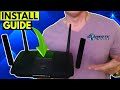
This video is How To Setup any Wireless Router! I\'ll take you through every step of the process in under 4 minutes! It\'s a quick and ...

HOW TO REPLACE YOUR HDMI CABLES - BEST 4k WIRELESS HDMI KIT - BMOSTE 4K WIRELESS HDMI EXTENDER UP TO ...
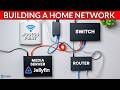
How To Build a Home Network for Beginners (2026 Guide). Learn how to build a Home Network for beginners step-by-step!

This Real-World Speed Test is between the TP-Link Archer BE550 Wi-Fi 7 Router & The ASUS RT-AXE7800 Wi-Fi 6e Router!