Utimate Tech Hub Logo

DESLOC V150 Plus Solar Smart Lock Review: 14 Days of Testing

Can a self-charging smart lock eliminate battery anxiety? Michael Scott tested the DESLOC V150 Plus for 14 days, checking solar charging, hands-free facial recognition, fingerprint access, and whether the lock still works when home Wi-Fi goes offline. Here is what he found, along with the features and limitations to consider before buying.
Why This Solar Smart Lock Is Different

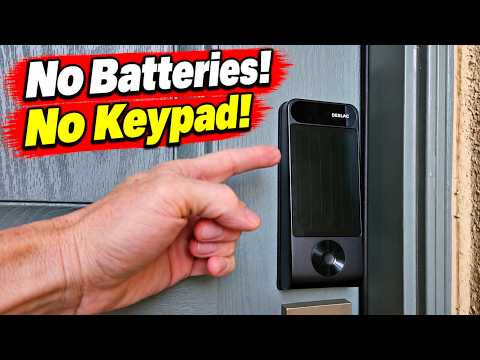
Many traditional smart locks rely on disposable AA batteries that need frequent replacement. Michael's previous smart lock required four AA batteries about every two to three months. The DESLOC V150 Plus aims to reduce that maintenance with an integrated solar panel and rechargeable 10,000 mAh battery.

The lock uses a perovskite solar panel, designed to collect energy from ambient light as well as direct sunlight. This matters for front doors recessed beneath porches or overhangs. A battery management system regulates energy collection and charging in changing light conditions. Low-light charging does not mean every installation will receive enough energy indefinitely, so door orientation and lighting still matter.

DESLOC V150 Plus Features at a Glance

FeatureWhat it means
PowerPerovskite solar charging and a rechargeable 10,000 mAh battery
Entry methods3D facial recognition, fingerprint, mechanical key, and mobile app
ConnectivityBuilt-in Wi-Fi without a separate hub; Bluetooth access nearby
Smart homeAlexa and Google Assistant support; no Matter support reported in the review
Weather resistanceIP65-rated exterior assembly
InstallationDeadbolt replacement; reviewer completed it in about 15 minutes

Hands-Free 3D Facial Recognition and Fingerprint Unlocking

The V150 Plus does not have a built-in numeric keypad. Instead, its standout feature is 3D facial recognition, which identifies an enrolled user approaching the door and can unlock without a touch. Michael tested this during the day and at night with himself, his wife, and his son. He reported successful unlocking in each test.

A curved fingerprint reader provides another convenient way to enter. DESLOC calls its adaptive fingerprint technology GPTfinger 2.0. Michael, who often has dry or cracked fingertips, reported no fingerprint recognition failures during his testing. A traditional mechanical key is available as a backup, and the DESLOC app provides a fourth unlocking option.

The review mentions a separate keypad accessory expected around February or March 2027. Confirm its current availability with DESLOC before relying on that option.

What Happened During the 14-Day Solar Charging Test?

Test result: With moderate use, the reported battery level remained at 100% for 14 consecutive days.

Michael documented the battery status around noon each day. His front door faces south and sits under a covered patio, where it receives some direct light and indirect light. The battery display remained full, including on cloudy days. This is an encouraging real-world result, but it is not a guarantee of identical performance on a darker porch or a more frequently used door.

DESLOC also advertises more than eight months of use on a charge without solar input. Michael explicitly noted that he had not tested that longer battery-life claim, since he had owned the lock for only about a month.

Does the DESLOC V150 Plus Work Without Wi-Fi?

To simulate an internet outage, Michael turned off his wireless router for one hour. Both the facial recognition and fingerprint reader continued to unlock the door. That means local entry does not depend on an active internet connection. App operation outside Bluetooth range, however, will be limited without internet connectivity.

The successful offline test supports the value of local biometric operation, but by itself does not independently verify every aspect of the product's data storage or privacy practices.

Installation, App Controls, and Security Features

Replacing Michael's existing deadbolt required only a screwdriver and approximately 15 minutes. He recommends fully charging the lock's battery via USB-C before installation. Homeowners should first check that their door has a compatible deadbolt opening, since a knob-only door is not a direct replacement.

The app allows access management and includes vacation, rest, and special care modes. The review highlights these additional functions:

Who Should Buy This Solar Smart Lock?

The DESLOC V150 Plus is especially appealing for homeowners who want less battery maintenance and hands-free access. It may also be useful for eligible cabins or other properties with suitable lighting, though reliable operation and remote controls depend on the specific setup.

It may be a less suitable choice for renters who cannot replace deadbolt hardware, households that depend on Matter or Apple Home integration, or short-term rental operators who require a built-in keypad. Check landlord or HOA rules before changing a lock.

Price and Final Verdict

At the time of the video, Michael quoted a DESLOC website price of approximately $259 and an Amazon price of around $222. These are historical figures from the review, not live offers. Check current listings, accessory availability, and any discounts before purchasing.

Bottom line: Michael's results were positive: the solar charging held the battery indicator at 100% over two weeks, biometric entry worked consistently in his tests, and both face and fingerprint unlocking continued during a router outage. The main compromises are the absence of a built-in keypad and lack of Matter support.

Frequently Asked Questions

Does the DESLOC V150 Plus charge in shade?

Its perovskite panel is designed to collect ambient light. Michael's partly covered porch provided enough light to maintain a full displayed battery during his 14-day test. Results depend on available light and use.

Will it unlock without an internet connection?

Yes. Facial recognition and fingerprint unlocking both worked during a one-hour router-off test. Remote app functions can be unavailable without internet.

Does it have a keypad?

There is no built-in keypad. The review discussed a separately sold accessory expected in early 2027. Confirm availability before purchase.

Is a separate Wi-Fi hub required?

No. The V150 Plus has built-in Wi-Fi and connects directly to a compatible home router.

Is installation difficult?

Michael replaced an existing deadbolt in roughly 15 minutes using a screwdriver. Your installation may take longer depending on door compatibility.

Does it support Matter?

No Matter support was reported in the video. It does integrate with Alexa and Google Assistant.

Let me ask you a personal question, and nothing weird here. Do you have a smart lock installed on your front door?

If you answered yes, then you know the frustration of battery anxiety. Smart locks are notorious for draining batteries quickly, usually at the worst times. If you answered no, no big deal. This video will help you decide whether a smart lock is right for you.

I've owned a smart lock for about seven years now, and the battery issue is my biggest complaint: four AA batteries every two or three months. It's inconvenient, and it costs real money. To be honest, I don't want to babysit my smart lock every two or three months. I just want it to work.

What may have solved this battery problem for good is a product called the DESLOC Solar Smart Lock. This is the V150 Plus, which includes some seriously cool tech, like a built-in solar panel to charge the battery. So there's no need to buy batteries. It works with Alexa and Google Home, and it also has built-in Wi-Fi that connects directly to your home router. No hub or bridge is needed, which makes setup easy. My older smart lock requires a hub, making it more complicated to set up.

I'm always skeptical about solar charging claims. DESLOC says you'll never need to manually charge your battery. They also say it works without an internet connection, which suggests the biometric data should be stored locally rather than in the cloud. And we all know the cloud is just someone else's computer.

Unlike most videos you'll see on this product, I'm going to test it for two weeks straight to see if the solar charging actually works. I'll also test it with Wi-Fi turned off. At the end of this video, I'll show you screenshots of the charging for 14 days straight and what happened when I turned off my router. The results were pretty surprising, so stay tuned.

How Solar Charging Works

How does the solar charging actually work? This solar panel isn't your typical panel, because it uses perovskite instead of silicon. Silicon panels are great in direct sunlight, but shaded areas can limit their performance. Most front doors are shaded under a porch or an eave, so a conventional panel may not perform as well there.

DESLOC did something smart and used perovskite instead. Perovskite doesn't require direct sunlight. This type of panel can collect energy from low, indirect light, or even indoor light. That's right: an overhead light can help charge it.

One more thing worth knowing: behind that panel is a 10,000 mAh battery. DESLOC runs it through what they call a battery management system, or BMS. In strong light, it throttles the charge so the battery doesn't get overheated, which matters on a south-facing door in the summer, like mine. In weak light, where many circuits stop charging, it keeps pulling in whatever charge it can find.

The solar panel takes up most of the space on this lock, and for good reason. To recharge the battery efficiently, it needs a large panel. That space would usually hold a keypad, but this smart lock doesn't have one.

Four Ways to Unlock the Door

I hear you barking, big dog, and you're probably wondering, "How the heck do you unlock the door without a keypad?" Like I said earlier, this lock has some slick tech.

Most notably, it has 3D facial recognition, which allows hands-free unlocking. This is my favorite feature, hands down, or hands off. It maps the actual 3D image of your face instead of using a flat 2D image. It combines that with a radar sensor that detects you as you walk up and activates the lock. By the time you reach the door, it's already unlocking. There's no bending down or standing directly in front of the door. It's pretty much effortless.

I tested this lock during the day and at night. It unlocked every time, and it worked the same for my wife and son. DESLOC quotes a false acceptance rate of 0.00001%, or approximately one in ten million.

If you prefer not to use facial recognition, there's a built-in fingerprint reader on the bottom of the lock. This one is truly impressive because it learns and adapts as your fingers change. The fingerprint reader uses an AI model called GPTfinger 2.0, which keeps up with small changes like cuts or dry skin. My fingers are always dry and cracked from living in a desert, and this fingerprint reader has never failed me. Not once. Basic fingerprint readers can't always do this.

The 3D facial recognition and fingerprint scanner make this one of the smartest locks I've ever tested, hands down. And if you're old school and prefer not to use those two features, a classic keyhole is hidden under the fingerprint reader for easy access. Those are three ways to get in without the app, and no keypad is needed.

Now let's talk about the app, which is the fourth way you can lock and unlock the door. There are plenty of options. DESLOC sells a keypad as a separate add-on if you want one. That keypad is expected to be available around February or March of 2027.

App Modes and Security Features

The app itself is simple to use and navigate. You can assign access to up to six users. It includes three modes: vacation mode, rest mode, and special care mode. Special care mode is great if you have kids because it can alert you if they don't come home on time. Sorry, kids, you're busted.

There are also five security features: auto-lock, which locks the door after a specified period; anti-hijacking access; face recognition; failed-attempt protection; and a door-ajar alert. The exterior lock assembly is IP65 weather-sealed, so it's designed for a range of outdoor conditions.

Installation and Battery Preparation

Now let's talk about installation. I've installed basic door locks and handles, but I'm not a professional. This installation was very easy. I already had an older smart lock, so this was a simple replacement. It's a standard deadbolt swap with a screwdriver, and it took about 15 minutes.

I recommend charging the battery for a few hours before installing it to get it topped off. You can charge it with a basic USB Type-C cable.

DESLOC claims eight months of use on one charge without any solar charging. I can't confirm that because I haven't tested it. I've only had this lock for about a month.

Results of the 14-Day Solar Charging Test

Okay, now it's time to talk about solar charging. How did it perform? After two full weeks of moderate use, the battery never went below 100%. Here are the screenshots I took every day around noon.

To be honest, I was skeptical, but the solar technology works and works amazingly well in my test. My front door faces due south and sits under a covered patio, so it gets a moderate amount of direct sunlight. Even on cloudy days, the panel kept charging. Amazing.

Testing Without Internet

But what about the internet? Does this lock work when the internet is turned off? Maybe there's a power outage, your router goes offline, or you forgot to pay your internet bill.

All right, the wireless router is turned off. We have no internet. Let's test the smart lock. We'll try facial recognition and the fingerprint reader to make sure both work.

Unlocked. It works with no internet.

Let's try the fingerprint now. Unlocked.

I turned off my router for one hour, and the lock's local unlocking features worked. Just a heads-up: the app won't work outside Bluetooth range when there's no internet. But facial recognition and the fingerprint scanner work offline. DESLOC says the facial and fingerprint data are stored locally rather than in the cloud. With today's surveillance and privacy concerns, that is a huge relief.

Who Is This Smart Lock For?

So who is this smart lock built for? Anyone who wants a secure and convenient way to get into their home. If you've ever been locked out of your house, this lock can help prevent that. Trust me, I've been locked out myself, and it cost me $700 for a locksmith to spend five minutes picking my door lock. Ouch.

If your home is off-grid, like a cabin, solar charging may help with battery maintenance too. You may want to skip it if you live in an apartment or condo, since you may not be allowed to install it. Check your HOA or property rules.

You'll also need a door that already has a compatible deadbolt. This isn't a direct replacement for a door with just a knob. It's also not Matter-compatible, so if you're deep into Apple Home or want everything on one standard, that's worth knowing.

If you really want a smart lock with a keypad, especially for an Airbnb or rental, this may not be the lock for you unless you buy the keypad add-on. That keypad is expected around February or March of 2027.

Price and Closing Thoughts

How much is the V150 Plus? At the time of filming, the retail price was about $259 on the DESLOC site, and it was around $222 on Amazon. The Amazon price will probably change, so don't quote me on that one. Make sure to check the pinned comment and video description for special discounts.

Thank you for watching this video. It means a lot to me. I'm Michael Scott, and I'll catch you in the next video.

Related Videos

Ocushield Blue Light Screen Protector - Best Blue Light Filter 2021?

A hot cup of coffee is a Fantastic Way to Help Support our Channel!☕https://www.buymeacoffee.com/ultimatetechhub Or You Can ...


Desloc V150 Plus: the Smart Lock with No Batteries!

Smart locks eat batteries. The DESLOC V150 Plus has a built-in perovskite solar panel that\'s supposed to keep it charged on its ...


Best Rgb Keyboard 2021- Gaming Keyboard under $30

Welcome back to The Ultimate Tech Hub. On today\'s episode we will Test & Review a RGB Gaming Keyboard from Pictek.


How to Replace Your Hdmi Cables - Best 4k Wireless Hdmi Kit - Bmoste

HOW TO REPLACE YOUR HDMI CABLES - BEST 4k WIRELESS HDMI KIT - BMOSTE 4K WIRELESS HDMI EXTENDER UP TO ...


Top Wi-fi 7 Mesh System - Tp-link Deco Be67 Mesh Router! Full Test!

Struggling with Wi-Fi in a Big Home or Multi-level Home? In this review, I put the TP-Link Deco BE67 Wi-Fi 7 Mesh System to the ...


Dyna-glo 5 Burner Lp Grill Review and Setup Dgh485crp/dgh485crp-d

Hi guys this is the Dyna-Glo 5 Burner Propane Gas Grill with SearPLUS features 5 stainless steel burners including a 15000 BTU ...